Getting Started with RC Flyer Pro
You can access RC Flyer Pro at rcflyerpro.com from any device – computer, tablet, or mobile phone. There’s no need to download anything from the app store; simply visit the website and the interface automatically adapts to your screen size. This means you can use it at the flying field on your phone, then review detailed information later on your computer.
When you first log in, you’re greeted by your hangar – a customisable dashboard featuring various widgets that bring key information to the forefront.
Customising Your Hangar Dashboard
The hangar uses a widget-based system that you can completely personalise. Available widgets include:
- Your models collection
- Local weather conditions
- Who’s currently online
- Flying statistics
- Recent flights
- Monthly leaderboards
- Social wall
Each widget can be resized, reordered by dragging, and configured to display exactly what you want. You can even create multiple dashboard tabs – for example, one for your main hangar view and another dedicated to weather conditions. These customisations sync across all your devices automatically.
Managing Your Model Fleet
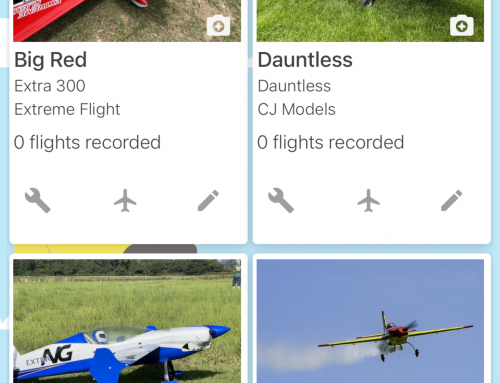
The models section allows you to maintain detailed records of every aircraft in your collection. For each model, you can store:
- Multiple photographs
- Specifications and details
- Investment costs (optional – perfect for keeping secrets from your partner!)
- Complete flight history
- Associated documents and manuals
One particularly useful feature is the ability to store PDF manuals for your aircraft and all its components. When you’re at the field and need to check something, everything is just one click away – no more searching through Google.
Safety Checks and Reminders
The application includes a comprehensive safety check system. You can log fail-safe tests, range checks, and other routine inspections, setting automatic reminders to ensure nothing gets overlooked. These checks are associated with both the model and its transmitter, creating a complete maintenance history.
Maintenance Tracking
The maintenance section helps you stay on top of regular servicing. You can create maintenance items specifying:
- What needs doing (e.g., “Check turbine” or “Replace propeller”)
- Severity level
- Due dates
- Recurring intervals (every X hours or X flights)
- Associated photographs
- Whether the model is grounded
The app will remind you when maintenance is due and maintain a complete log of everything you’ve done.
Flight Logging Made Simple
Flight logging was the original inspiration for RC Flyer Pro, and it remains at the heart of the application. There are two ways to log flights:
Manual Entry
Enter flight details including duration, location, conditions, and notes. If you’re tracking batteries, you can log which pack you used, remaining voltage, and cycle counts. You can also record fuel consumption for petrol models.
Field Mode
This quick-entry method is perfect when you’re at the flying field. Simply select your model, tap “Go” when you take off, and tap “Landed” when you’re done. The app automatically calculates flight duration and logs everything for you.
GPS Flight Replay in 3D
One of the most impressive features is the 3D flight replay system. RC Flyer Pro supports GPS data from multiple devices:
- RC Flight Systems GPS Black Box
- Flight Coach
- Jet Accessories
- Futaba GPS sensors
- Spektrum telemetry
- RadioMaster
- Pixhawk
- Ethos telemetry
- Jeti
Upload your GPS log files and watch your flights played back in stunning 3D visualisation. The replay includes:
- Speed and altitude displays
- Transmitter stick movement (if supported by your GPS device)
- Historical weather data from when you flew
- Key flight events (takeoff, highest point, top speed, hardest pull, landing)
- Satellite fix information
- Full GPS coordinate tracking
You can customise the replay view, change camera angles to follow the aircraft, adjust playback speed, and even share particularly impressive flights publicly. The interface supports multiple languages including French, Dutch, German, Spanish, and Italian.
Find My Model Feature
If you experience an unfortunate incident where your model flies away or goes down somewhere, the Find My Model feature can be a lifesaver. Upload your GPS file to the app, and it will show you:
- The last recorded GPS coordinates
- Directional arrows pointing towards your model
- Navigation instructions
- An approximate search area when you’re close
You can even share the location with friends so they can help with the search. It’s like “Find My Phone” but for your aircraft.
Weather and Flying Conditions
The weather widget provides real-time, location-specific forecasts including:
- Wind speed and direction throughout the day
- Hours of daylight remaining
- Rain likelihood
- Visibility and fog risk
- LiPo temperature guidance (whether to keep batteries in warm pockets)
- Interactive wind maps
For slope soaring enthusiasts, the soaring conditions widget indicates whether your slope is working based on current wind conditions.
Battery Management
Track your LiPo and battery packs in detail, recording:
- Manufacturer and specifications
- Chemistry, capacity, cells, and C rating
- Maximum cycle rating with alerts
- Internal resistance measurements for all cells
- Purchase date and cost
- Cost per flight calculations
- Battery health assessments
- Storage charge status
Every time you log a flight, the cycle count automatically updates for the batteries you used. You can even attach QR codes or NFC tags to your batteries for instant identification.
Transmitter Tracking
Keep detailed records of your transmitters, including:
- Model and serial number
- Current firmware version
- Associated models
- Usage statistics
- Manuals and documents
- Purchase information
- Service history
- Battery charge cycles
The app will automatically check for firmware updates and alert you when new versions are available – something I strongly encourage everyone to stay on top of. You can also upload and store transmitter backups in the cloud, ensuring you always have access to your model configurations even when away from home.
Component Library
Build a database of all the components in your models – servos, gyros, receivers, speed controllers, and more. This allows you to:
- Track component locations across your fleet
- Store manuals for each component
- Calculate total model costs
- Swap components between models whilst maintaining history
- Transfer complete service histories when selling models
When you sell a model, you can transfer all flight data, maintenance records, component information, and history to the new owner – creating a complete service history similar to what you’d expect with a car.
Flying Sites and Clubs
The application currently features over 2,140 flying sites around the globe, with the community constantly adding more. For each site, you can:
- View location on an interactive map
- See site rules and information
- Check real-time weather conditions
- Mark no-fly zones in red
- Designate recommended flying areas in green
- Draw runway locations
- Post messages to other pilots using the site
The runway feature includes a clever touch – a green arrow automatically indicates the recommended takeoff direction based on live wind data, updating throughout the day as conditions change.
When you replay GPS flights from sites with marked no-fly zones, the system will alert you if you accidentally strayed into restricted areas.
Additional Features
The Graveyard
When the unfortunate happens and you lose a model, you can retire it to the graveyard – a global memorial visible to all app users where you can record what happened. It’s a bit of fun, though admittedly something we all experience from time to time.
Checklists
Create custom pre-flight checklists and associate them with specific models. The app will remind you to complete them before flying.
Wish List
Track items you’d like to purchase for the hobby. When you buy something, you can mark it as purchased or convert it directly into a component or model in your fleet.
Marketplace
A lightweight marketplace feature allows you to list models for sale. The app uses AI to automatically generate listing descriptions, and you can transfer complete model histories to buyers who use RC Flyer Pro.
Free vs Pro Features
RC Flyer Pro offers substantial functionality in its free tier, with pro membership unlocking additional features and capabilities. I’m offering readers a 6-month free access code to experience everything the pro version has to offer.
Final Thoughts
The beauty of RC Flyer Pro is that you can use as much or as little as you want. If you only need flight logging, that’s fine. If you want to track every detail of your models, batteries, and components, you can do that too. The application is community-driven, constantly evolving, and supports our hobby in ways that simply weren’t possible before.
Whether you’re accessing it from your phone at the flying field or reviewing detailed statistics on your computer at home, RC Flyer Pro adapts to how you want to work. Give it a try – head to rcflyerpro.com and see how it can enhance your RC flying experience.